Amazon EventBridge
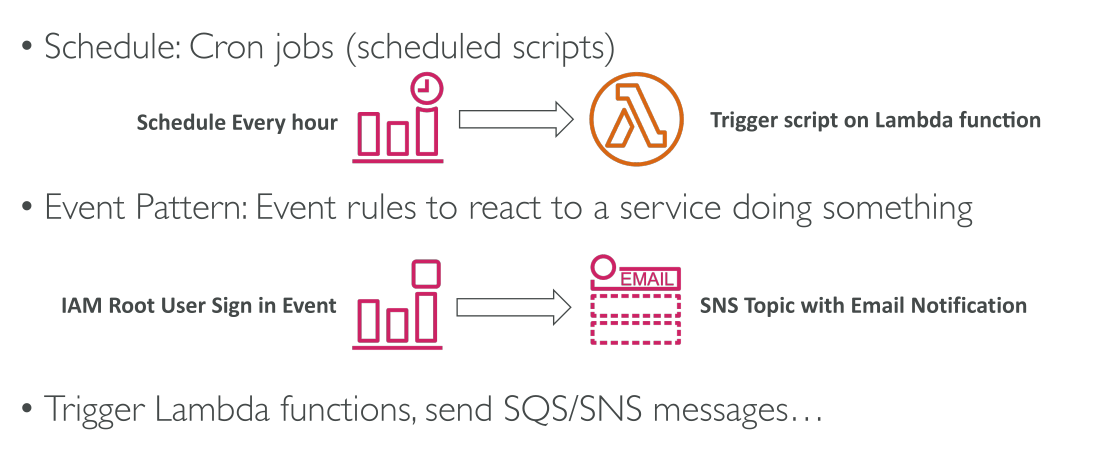
Amazon EventBridge (เดิมชื่อ CloudWatch Events) เป็นบริการที่ช่วยให้คุณสามารถ ตั้งเวลาและตอบสนองต่อเหตุการณ์ (events) ภายใน AWS ได้ แม้ว่าชื่อจะเปลี่ยนไป แต่ในเอกสารหรือประสบการณ์เก่า ๆ อาจยังเจอชื่อ CloudWatch Events
- EventBridge สามารถตั้ง cron jobs บนคลาวด์ เช่น เรียก Lambda ทุกชั่วโมงเพื่อรันสคริปต์
- นอกจากนี้ EventBridge ยังสามารถตอบสนอง event patterns เฉพาะ เช่น เมื่อ root user เข้าสู่ระบบ AWS Console
- ตัวอย่าง: เมื่อ root user ลงชื่อเข้าใช้งาน → ส่งข้อความไปยัง SNS Topic เพื่อรับการแจ้งเตือนทางอีเมล เป็นฟีเจอร์ด้านความปลอดภัยที่สำคัญ
EventBridge รองรับ หลายปลายทาง (destinations) ของ events เช่น Lambda, SNS, SQS เป็นต้น
Event Sources และ Event Flow
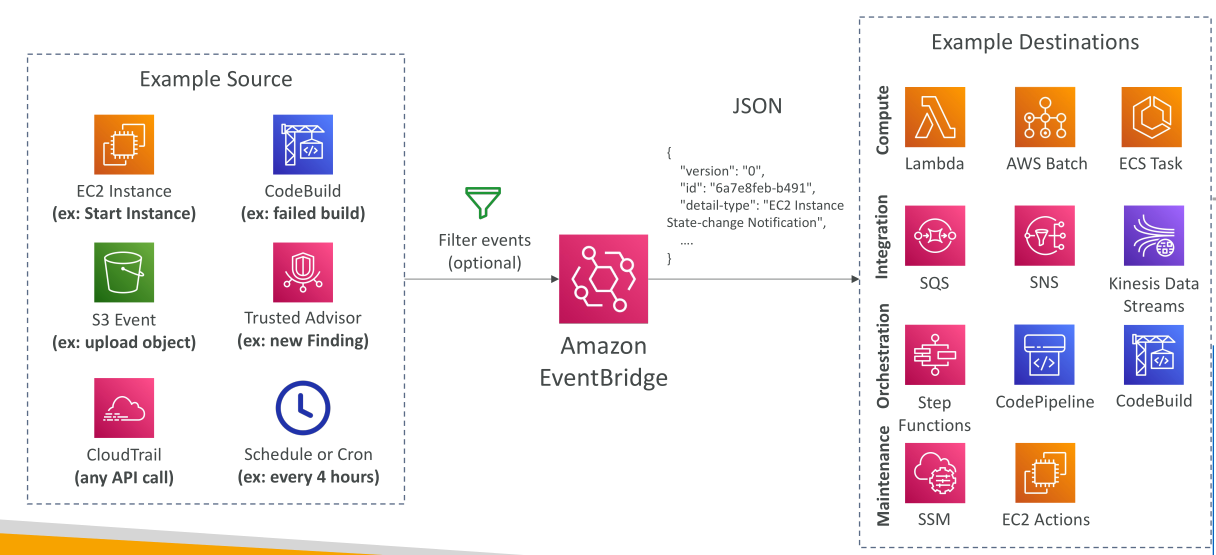
EventBridge ทำหน้าที่เป็น ศูนย์กลาง ที่รวม events จากหลายแหล่ง เช่น:
- EC2 instance เริ่มทำงาน, หยุด หรือ terminate
- CodeBuild build ล้มเหลว
- อัปโหลด object ไปยัง S3
- Trusted Advisor security findings
การรวมกับ CloudTrail: สามารถดักจับทุก API Call ในบัญชี AWS เพื่อการมอนิเตอร์อย่างละเอียด
- สามารถตั้ง Scheduled Events ด้วย cron expression เช่น ทุก 4 ชั่วโมง หรือ วันจันทร์แรกของเดือน เวลา 08:00
- EventBridge จะสร้าง JSON document แสดงรายละเอียด event เช่น instance ID, timestamp, IP address
Event Destinations และ Integrations
หลังจาก events ถูกประมวลผล สามารถส่งไปยังหลายปลายทาง เช่น:
- เรียก Lambda functions
- สั่ง AWS Batch jobs
- Launch Amazon ECS tasks
- ส่งข้อความไปยัง SQS หรือ SNS
- Streaming ข้อมูลไป Kinesis Data Streams
- เริ่ม Step Functions
- Initiate CodePipeline หรือ CodeBuild
- รัน SSM automation หรือ actions ของ EC2 เช่น start, stop, restart
Event Buses ใน Amazon EventBridge
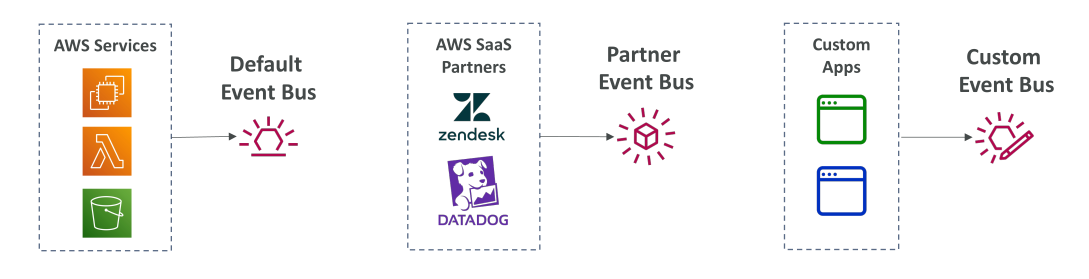
EventBridge มี ประเภทของ Event Bus หลัก 3 แบบ:
- Default Event Bus: รับ events จาก AWS Services
- Partner Event Bus: เชื่อมต่อกับ SaaS Partners เช่น Zendesk, Datadog, Auth0
- Custom Event Bus: สร้าง event bus ของตัวเองสำหรับส่ง custom events
Event Buses ช่วยให้คุณ กำหนดเส้นทาง events ไปยังปลายทางต่าง ๆ ผ่าน EventBridge Rules
Cross-Account Access และ Event Archiving
-
EventBridge รองรับ cross-account event bus access ผ่าน resource-based policies
- เช่น สามารถให้ central event bus ภายใน AWS Organization รวบรวม events จากหลายบัญชี
-
EventBridge สามารถ เก็บ events เป็น archive ได้
- เก็บแบบไม่จำกัดเวลา หรือกำหนด retention period
- สามารถ replay events เพื่อ debug, troubleshoot หรือแก้ไขปัญหา production
Schema Registry
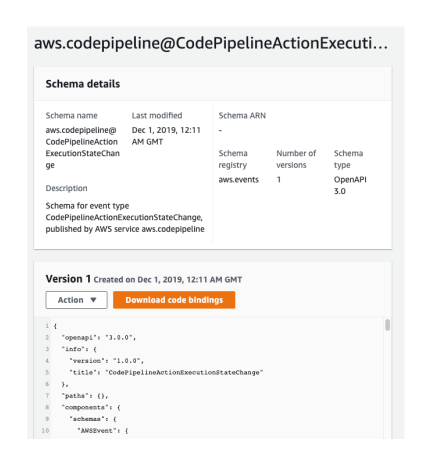
- EventBridge มีฟีเจอร์ Schema Registry วิเคราะห์ events บน event bus
- สามารถ สร้างโค้ดในแอปพลิเคชัน ที่เข้าใจโครงสร้างของ events ได้ล่วงหน้า
- Schema versioning → ทำให้ปรับปรุงโครงสร้าง events ของแอปได้ตามเวลา
- ตัวอย่าง: Schema สำหรับ CodePipeline Event → ดาวน์โหลดและใช้ในโค้ดได้ทันที
การรวม Events หลายบัญชีด้วย Amazon EventBridge
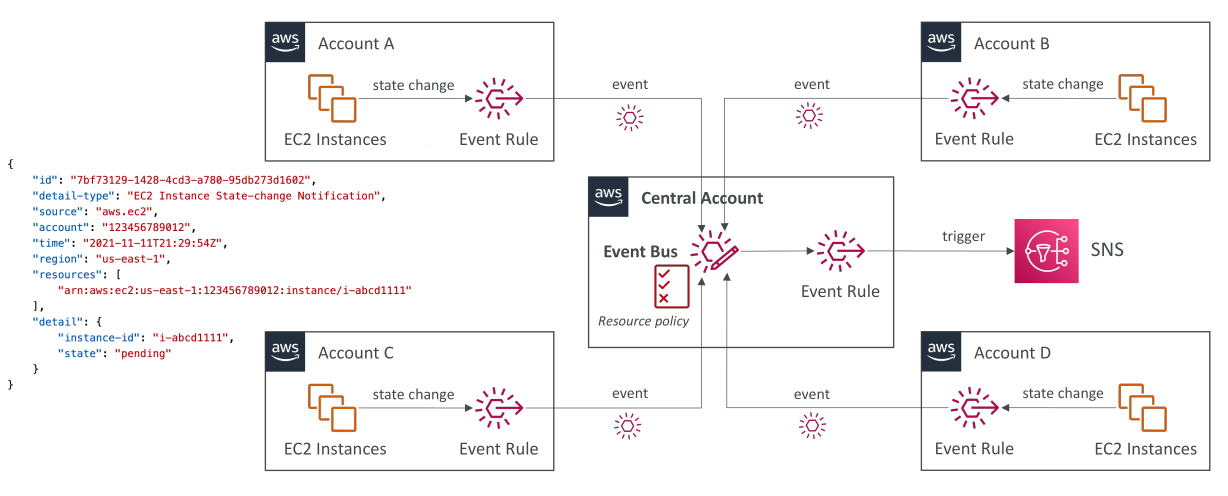
การบรรยายนี้อธิบายวิธีการ รวม events จากหลายบัญชี AWS เข้าบัญชีกลาง (central account) ด้วย Amazon EventBridge จุดประสงค์คือเพื่อให้สามารถ จัดการ events ทั้งหมดจากหลายบัญชี AWS ในบัญชีกลางเดียว ได้
ตัวอย่าง: หากคุณสร้าง EC2 instances ในหลายบัญชี AWS คุณอาจต้องการเก็บ events ทั้งหมดเหล่านี้ไว้ในบัญชีกลาง
วิธีการทำงาน
-
กำหนด Event Pattern ในแต่ละบัญชี
- สร้าง Event Rule ในแต่ละบัญชี เพื่อจับทุกการเปลี่ยนแปลงสถานะของ resources เช่น EC2 instance
-
ตั้ง Target ของ Event Rule
- Target ของ Event Rule ในบัญชีหนึ่ง สามารถเป็น Event Bus ของบัญชีอื่น ได้
- ทำให้ events จากหลายบัญชี รวมเข้าบัญชีกลาง
-
สร้าง Resource Policy บน Event Bus ของบัญชีกลาง
- Resource Policy นี้จะอนุญาตให้บัญชีอื่น ๆ ส่ง events มายัง Event Bus ของบัญชีกลาง
-
นำ Pattern ไปใช้หลายบัญชี
- เช่น บัญชี A, B, C, D → Events การเปลี่ยนแปลงสถานะของ EC2 instances จะถูกส่งไปยัง Event Bus ของบัญชีกลาง
การใช้งานต่อ
หลังจาก events ถูก รวมเข้าบัญชีกลาง แล้ว:
-
สามารถสร้าง Event Rules บน Event Bus กลาง
-
เพื่อ trigger action ต่าง ๆ เช่น
- SNS notifications
- Lambda functions
- หรือบริการอื่น ๆ ของ AWS ตามความต้องการ
สถาปัตยกรรมนี้ช่วยให้สามารถ มอนิเตอร์และจัดการ events จากหลายบัญชี AWS ได้อย่างมีประสิทธิภาพ
สรุป
Amazon EventBridge ช่วยให้คุณ ตอบสนองต่อเหตุการณ์ใน AWS โดยใช้:
- Default Event Bus (AWS Services)
- Partner Event Bus (SaaS Providers)
- Custom Event Bus (Custom Events)
ฟีเจอร์สำคัญ:
- Schema Registry → วิเคราะห์โครงสร้าง events
- Resource-based policies → กำหนดสิทธิ์ cross-account
- Event archiving + replay → ทดสอบหรือแก้ไขปัญหา production
คุณสามารถสร้าง Event-Driven Architecture ที่ซับซ้อนและยืดหยุ่นตามความต้องการได้
Key Takeaways
- EventBridge (เดิม CloudWatch Events) → ตั้งเวลาและตอบสนองต่อ events ใน AWS
- รองรับหลาย Event Bus: Default, Partner, Custom → จัดการแหล่ง events และ integration ได้หลากหลาย
- Events สามารถ trigger services หลายประเภท: Lambda, SNS, SQS, ECS, Step Functions, CodePipeline และอื่น ๆ
- ฟีเจอร์สำคัญ: Schema Registry, Resource-based policies สำหรับ cross-account, และ Event Archiving + Replay
- การรวม events หลายบัญชีด้วย EventBridge → ทำให้ จัดการ events แบบรวมศูนย์ (centralized) ได้
- Event Rules ในบัญชีหนึ่ง → สามารถ target Event Bus ในบัญชีอื่น ได้
- ต้องมี Resource Policy บน Event Bus กลาง → เพื่ออนุญาตรับ events จากบัญชีอื่น
- Event Bus แบบรวมศูนย์ → สามารถ trigger actions เช่น SNS, Lambda ตาม events ที่รวมเข้ามา