Developer Certified
Long Polling ใน SQS
-
Long polling คือ การให้ consumer “รอ” ข้อความหาก queue ว่าง
-
ตัวอย่าง:
- Queue ว่างอยู่
- Consumer ส่งคำร้องขอรับข้อความ
- หากเปิด long polling, consumer จะรอจนมีข้อความเข้ามาใน queue
-
เมื่อมีข้อความใหม่เข้ามา Consumer จะได้รับข้อความทันที
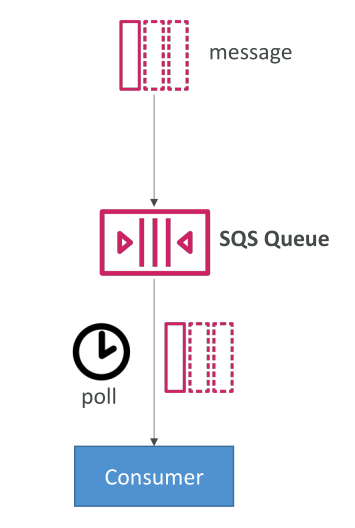
ประโยชน์ของ Long Polling:
- ลดจำนวน API calls ไปยัง SQS
- ใช้ CPU น้อยลง เพิ่มประสิทธิภาพ
- ลด latency เพราะข้อความจะส่งไปยัง consumer ทันที
- Long polling ตั้งค่าได้ระหว่าง 1–20 วินาที (แนะนำใช้ 20 วินาที)
- สามารถตั้งได้ทั้งที่ queue level หรือ API call level
- ที่ API call ใช้ ReceiveMessageWaitTimeSeconds เพื่อเปิด long polling
Use case ในสอบ:
- ถ้ามีคำถามว่า consumer ทำ API call เยอะเกินไป → ใช้ long polling เพื่อลดค่าใช้จ่าย, CPU, และ latency
SQS Extended Client สำหรับข้อความขนาดใหญ่
- ขนาดข้อความสูงสุดใน SQS คือ 256 KB
- หากต้องการส่งข้อความใหญ่ เช่น 1 GB
- ใช้ SQS Extended Client (Java library) หรือ pattern ในภาษาอื่น
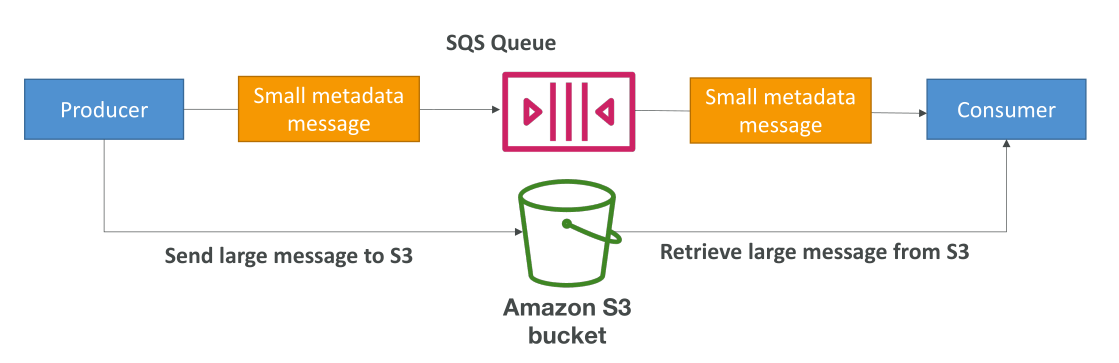
หลักการทำงาน:
- Producer เก็บข้อความขนาดใหญ่ลง Amazon S3
- ส่งข้อความเล็ก ๆ (metadata) ไปยัง SQS พร้อม pointer ไปยังข้อความใน S3
- Consumer ใช้ Extended Client อ่าน metadata → โหลดข้อความใหญ่จาก S3
Use case:
- ส่งไฟล์วิดีโอ
- แทนที่จะส่งไฟล์ทั้งไฟล์ผ่าน SQS → อัปโหลดไฟล์ไป S3 แล้วส่ง pointer ผ่าน SQS
Overview ของ API calls ที่สำคัญใน SQS
| API Call | คำอธิบาย |
|---|---|
| CreateQueue | สร้าง queue ใหม่ สามารถตั้ง MessageRetentionPeriod |
| DeleteQueue | ลบ queue พร้อมข้อความทั้งหมด |
| PurgeQueue | ลบข้อความทั้งหมดใน queue แต่ไม่ลบ queue |
| SendMessage | ส่งข้อความไป queue ใช้ DelaySeconds เพื่อหน่วงเวลา |
| ReceiveMessage | รับข้อความจาก queue |
| DeleteMessage | ลบข้อความหลังประมวลผลแล้ว |
| ChangeMessageVisibility | เปลี่ยน visibility timeout ของข้อความ |
รายละเอียดเพิ่มเติม:
MaxNumberOfMessagesในReceiveMessageตั้งค่า default = 1 (สามารถรับ batch สูงสุด 10)ReceiveMessageWaitTimeSeconds→ ควบคุม long polling- มี Batch API สำหรับ SendMessage, DeleteMessage, ChangeMessageVisibility → ลดจำนวน API calls → ประหยัดค่าใช้จ่าย
การสาธิต Long Polling ใน AWS Console
- ค่า Receive message wait time เริ่มต้น = 0 วินาที → short polling
- ตั้งค่า 1–20 วินาที → เปิด long polling
- ตั้ง 20 วินาที → consumer จะรอสูงสุด 20 วินาที หาก queue ว่าง
- ส่งข้อความ
"hello world"→ consumer รับข้อความทันที → latency ต่ำ
ประโยชน์:
- ลดจำนวน API calls
- ลด latency
- เพิ่มประสิทธิภาพการประมวลผล
Key Takeaways
- Long polling ช่วยให้ consumer รอข้อความ ลด API calls และ latency
- SQS Extended Client ช่วยส่งข้อความขนาดใหญ่ โดยเก็บข้อความใน S3 และส่ง pointer ผ่าน SQS
- API calls สำคัญ: CreateQueue, DeleteQueue, PurgeQueue, SendMessage, ReceiveMessage, DeleteMessage, ChangeMessageVisibility
- Batch API calls → ลดจำนวน requests → ลดค่าใช้จ่ายและเพิ่มประสิทธิภาพ