Application Load Balancer (ALB)
- ALB เป็น Load Balancer แบบ Layer 7 (HTTP Layer)
- ใช้สำหรับ Routing หลายแอปพลิเคชัน HTTP ข้ามหลายเครื่อง
- เครื่องเหล่านี้ถูกจัดกลุ่มใน Target Group
- ALB สามารถ Load Balance หลายแอปพลิเคชันบน EC2 instance เดียวกัน เหมาะสำหรับ Containers และ ECS
- รองรับ HTTP/2, WebSockets, และ Redirects เช่น การ redirect จาก HTTP → HTTPS
ฟีเจอร์ Routing ขั้นสูง
ALB รองรับ Route-Based Routing เช่น:
- Routing ตาม path ของ URL:
/users→ target group A,/posts→ target group B - Routing ตาม hostname ของ URL:
one.example.com→ target group A,other.example.com→ target group B - Routing ตาม query string และ headers:
example.com/reserves?id=123&order=false→ target group ตามเงื่อนไข
ข้อดีสำหรับ Microservices & Containers:
- ALB รองรับ Port Mapping → redirect ไปยัง dynamic port บน ECS instance
- ต่างจาก Classic Load Balancer (CLB) ที่ต้องใช้ CLB หลายตัว สำหรับหลายแอปพลิเคชัน
- ALB ตัวเดียวสามารถจัดการหลายแอปพลิเคชันได้
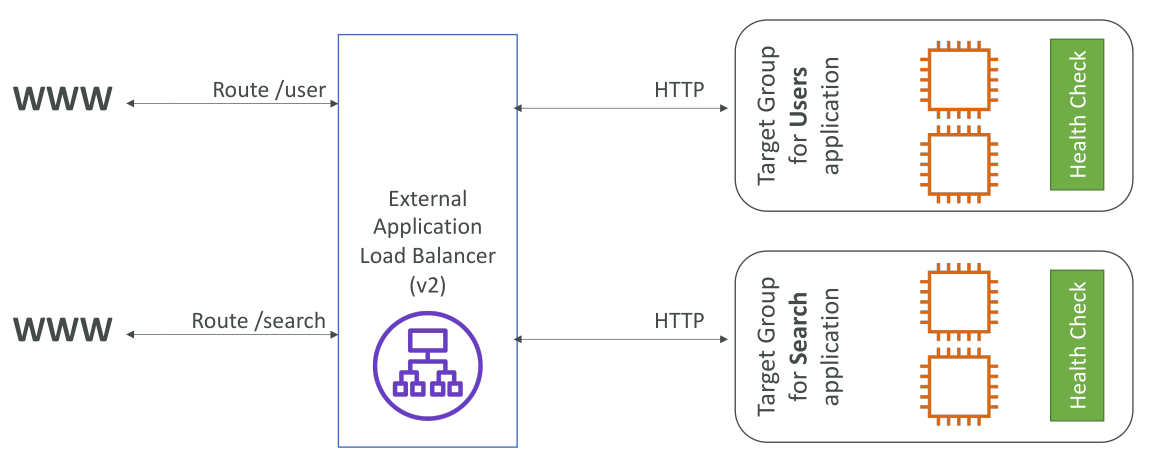
สถาปัตยกรรม ALB และ Target Groups
-
ตัวอย่าง: ALB หน้าสาธารณะ (public facing)
- Target Group 1 → EC2 instances สำหรับ
/userroute - Target Group 2 → EC2 instances สำหรับ
/searchroute
- Target Group 1 → EC2 instances สำหรับ
-
ALB Route Requests ตามกฎ เช่น
/search→ Target Group ของ Search -
Target Groups สามารถประกอบด้วย:
- EC2 instances (จัดการด้วย Auto Scaling Groups)
- ECS tasks
- Lambda functions (ALB รองรับ serverless)
- Private IP addresses (ต้องเป็น private IP)
-
ALB สามารถ route ไปยังหลาย Target Groups และ Health Check จะทำที่ระดับ Target Group
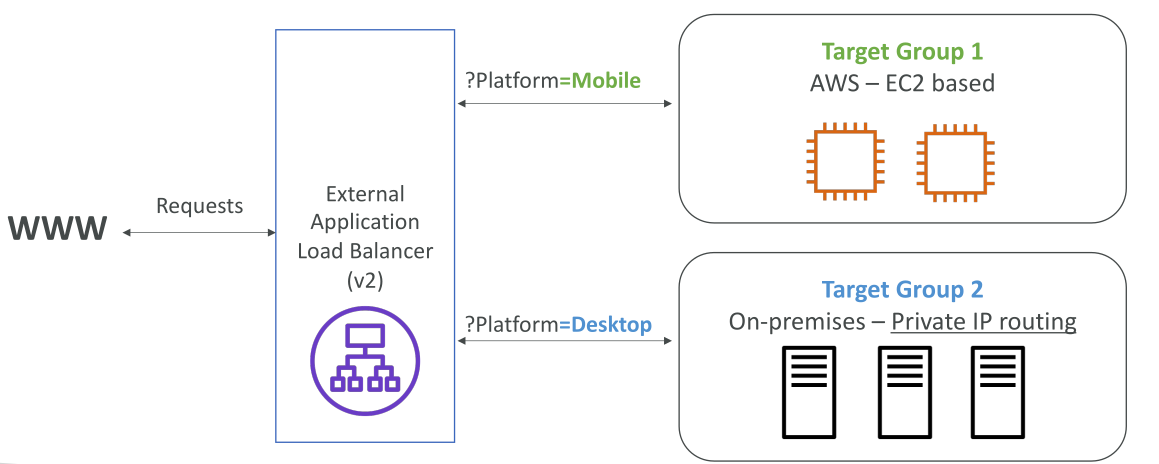
ตัวอย่าง Routing ตาม Platform ของ Client
-
Target Group 1 → AWS EC2 instances
-
Target Group 2 → Private servers ใน Data Center ของเรา
-
ต้องการส่ง Traffic:
- Mobile → Target Group 1
- Desktop → Target Group 2
-
ทำได้โดย Query String / Parameter-Based Routing เช่น
?platform=mobile→ Target Group 1
ฟีเจอร์เพิ่มเติมของ ALB
-
ได้ hostname คงที่ เหมือน CLB
-
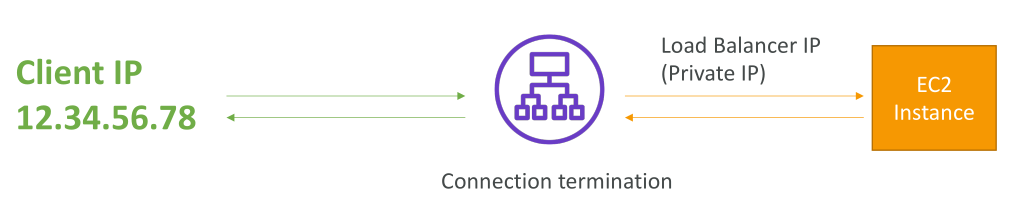
Client IP ไม่เห็นโดยตรงจาก application servers
- แทนที่จะเห็น Client IP จริง → จะถูกใส่ใน HTTP Header: X-Forwarded-For
- Port → X-Forwarded-Port, Protocol → X-Forwarded-Proto
-
ตัวอย่าง: Client IP = 12.34.56.78 → ติดต่อ ALB โดยตรง
- ALB ทำ Connection Termination → ติดต่อ EC2 ด้วย private IP ของ ALB
- EC2 ต้องดู Header พิเศษเพื่อตรวจสอบ Client IP, Port, Protocol
Good to Know
- Fixed hostname (XXX.region.elb.amazonaws.com)
- The application servers don’t see the IP of the client directly
- The true IP of the client is inserted in the header X-Forwarded-For
- We can also get Port (X-Forwarded-Port) and proto (X-Forwarded-Proto)
สรุป Key Takeaways
- ALB ทำงาน Layer 7, รองรับ HTTP และ Routing หลายแอปพลิเคชัน
- รองรับ Advanced Routing: Path-Based, Host-Based, Query String, Header-Based
- Target Groups → EC2 instances, ECS tasks, Lambda functions, หรือ private IPs
- ALB ให้ hostname คงที่ และใช้ headers เช่น X-Forwarded-For เพื่อเก็บ Client IP ขณะ Connection Termination