DynamoDB WCU & RCU – Throughput
ในหัวข้อนี้เราจะพูดถึง โหมดความสามารถในการอ่านและเขียน (Read/Write Capacity Modes) ของ DynamoDB ซึ่งควบคุม throughput ของ table
- คุณต้องกำหนด throughput สำหรับการอ่านและเขียนล่วงหน้า
- DynamoDB มี 2 โหมดหลัก:
-
Provisioned mode
- คุณกำหนดจำนวนการอ่านและเขียนต่อวินาที (Read Capacity Units – RCU และ Write Capacity Units – WCU)
- ต้องจ่ายเงินตาม capacity ที่ provisioned ไม่ว่าคุณจะใช้จริงหรือไม่
-
On-demand mode
- การอ่านและเขียนปรับขนาดอัตโนมัติตาม workload
- ไม่ต้องวางแผน capacity
- จ่ายเงินตามการใช้งานจริง แต่ราคาสูงกว่า provisioned mode
คุณสามารถสลับโหมดทั้งสองได้ ครั้งละ 1 ครั้งต่อ 24 ชั่วโมง
Provisioned Read & Write Capacity Units
ใน Provisioned mode
- คุณต้องกำหนด RCU และ WCU
- สามารถตั้ง Auto-scaling เพื่อปรับ throughput ตามความต้องการ
- หากเกิน provisioned capacity → ใช้ burst capacity ชั่วคราว
- หาก burst capacity หมด → จะเจอ ProvisionedThroughputExceededException
- แนะนำให้ retry ด้วย exponential backoff
รายละเอียด Write Capacity Unit (WCU)
- 1 WCU = การเขียน 1 ครั้งต่อวินาที สำหรับ item ขนาด ≤ 1 KB
- หาก item ใหญ่กว่า 1 KB → ใช้ WCU เพิ่มขึ้น ปัดขึ้นเป็น 1 KB ต่อหน่วย
ตัวอย่าง:
-
เขียน 10 items/วินาที, ขนาด 2 KB
WCU = 10 × 2/1 = 20 -
เขียน 6 items/วินาที, ขนาด 4.5 KB (ปัดขึ้นเป็น 5 KB)
WCU = 6 × 5/1 = 30 -
เขียน 120 items/นาที, ขนาด 2 KB
- แปลงเป็น items/วินาที: 120 / 60 = 2
WCU = 2 × 2/1 = 4
Read Capacity Units (RCU) และ Consistency Models
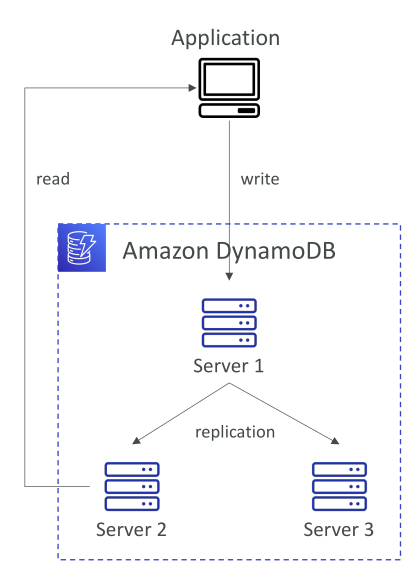
DynamoDB รองรับ 2 แบบของการอ่าน:
-
Eventually Consistent Reads (default)
- ข้อมูลอาจล้าหลังชั่วคราวหลังการเขียน
- จะคงความสอดคล้องหลัง ~100 ms
-
Strongly Consistent Reads
- อ่านข้อมูลล่าสุดทันทีหลังการเขียน
- ต้องตั้ง
ConsistentRead=Trueใน API เช่นGetItem, BatchGetItem, Query, Scan - ใช้ RCU 2 เท่า ของ Eventually Consistent
- อาจมี latency สูงกว่าเล็กน้อย
รายละเอียด Read Capacity Unit (RCU)
-
1 RCU =
- 1 strongly consistent read/วินาที สำหรับ item ≤ 4 KB
- 2 eventually consistent reads/วินาที สำหรับ item ≤ 4 KB
-
หาก item > 4 KB → RCUs เพิ่มขึ้น ปัดขึ้นเป็น 4 KB ต่อหน่วย
ตัวอย่าง:
-
10 strongly consistent reads/วินาที, item 4 KB
RCU = 10 × 4/4 = 10 -
16 eventually consistent reads/วินาที, item 12 KB
- แปลง: 16 / 2 × 12 / 4 = 8 × 3 = 24
RCU = 24 -
10 strongly consistent reads/วินาที, item 6 KB (ปัดขึ้นเป็น 8 KB)
RCU = 10 × 8/4 = 20
Partition ของ DynamoDB และการกระจาย Throughput
- Table ประกอบด้วย Partitions → ข้อมูลเก็บบนเซิร์ฟเวอร์เฉพาะ
- การเขียนข้อมูล → Partition Key จะถูก hash เพื่อกำหนด partition
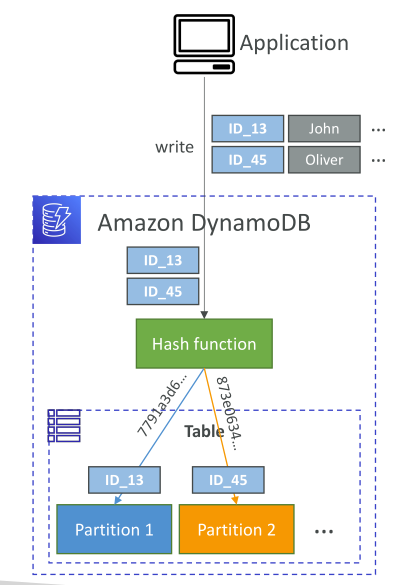
ตัวอย่าง:
-
Partition Key
ID_13→ Partition 1 -
Partition Key
ID_45→ Partition 2 -
Provisioned WCU/RCU จะแจกจ่าย เท่า ๆ กัน ระหว่าง partitions
- เช่น มี 10 partitions และ provision 10 WCU/RCU → แต่ละ partition ได้ 1 WCU + 1 RCU
-
Hot partitions เกิดเมื่อ key เดียวถูกเข้าถึงมากเกินไป → อาจเจอ throttling / ProvisionedThroughputExceededException
การจัดการ Throttling & Hot Partitions
- ใช้ exponential backoff retry เมื่อเจอ ProvisionedThroughputExceededException
- กระจาย partition keys ให้สม่ำเสมอ
- สำหรับ workload อ่านหนักจาก key เดียว → ใช้ DynamoDB Accelerator (DAX) เพื่อลด latency และ offload reads
On-Demand Capacity Mode
- ปรับ read/write capacity อัตโนมัติตาม workload
- ไม่ต้องวางแผน capacity
- ไม่มี throttling → จ่าย ตามจำนวน request
- ใช้ Read Request Units (RRU) และ Write Request Units (WRU) แทน RCU/WCU
- ราคาประมาณ 2.5 เท่า ของ provisioned mode
- เหมาะสำหรับ workload ไม่แน่นอนหรือไม่รู้จำนวนล่วงหน้า
Key Takeaways
-
DynamoDB มี 2 โหมด capacity: Provisioned และ On-demand
-
WCU และ RCU เป็นตัวกำหนด throughput
- ขึ้นอยู่กับ ขนาด item และ read consistency
-
Strongly Consistent Reads → ใช้ RCU 2 เท่า แต่ได้ข้อมูลล่าสุดทันที
-
Partition → กระจาย throughput; hot partition → throttling
- แก้ด้วย exponential backoff และออกแบบ partition key ดี ๆ